I have a small open-source project called qualityoflife. It is an LLM-curated personal newsletter: a Python and Shell pipeline that pulls from RSS feeds for newsletters, audiobooks, and YouTube video titles, scores items with Gemini, and writes a digest into my self-hosted SilverBullet wiki. It runs weekly on my homelab. It works. I use it to keep up with my own field, with tech in general, and with my personal hobbies and interests. I do not miss newsletters filling up my inbox anymore, or the FOMO when I do not have time to check them all.
So why did I just spend an evening rebuilding one slice of it in n8n?
Curiosity, mostly. n8n has a ton of GitHub stars and Reddit is full of discussion about it, and I wanted to find out whether it is really as easy to use as advertised. I also want to know which toolkit deserves a place in my mental model for the next thing I build.
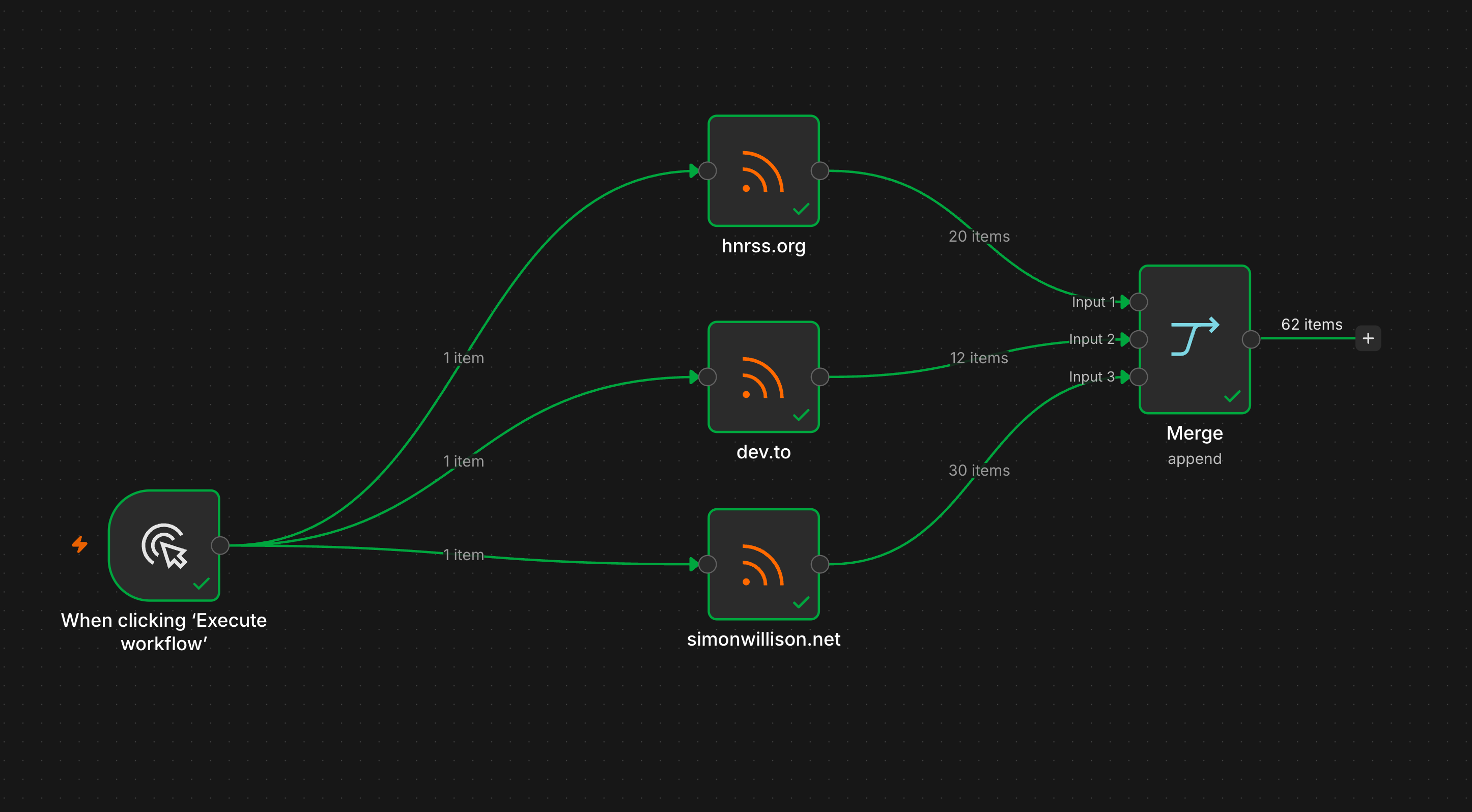 Where it all started.
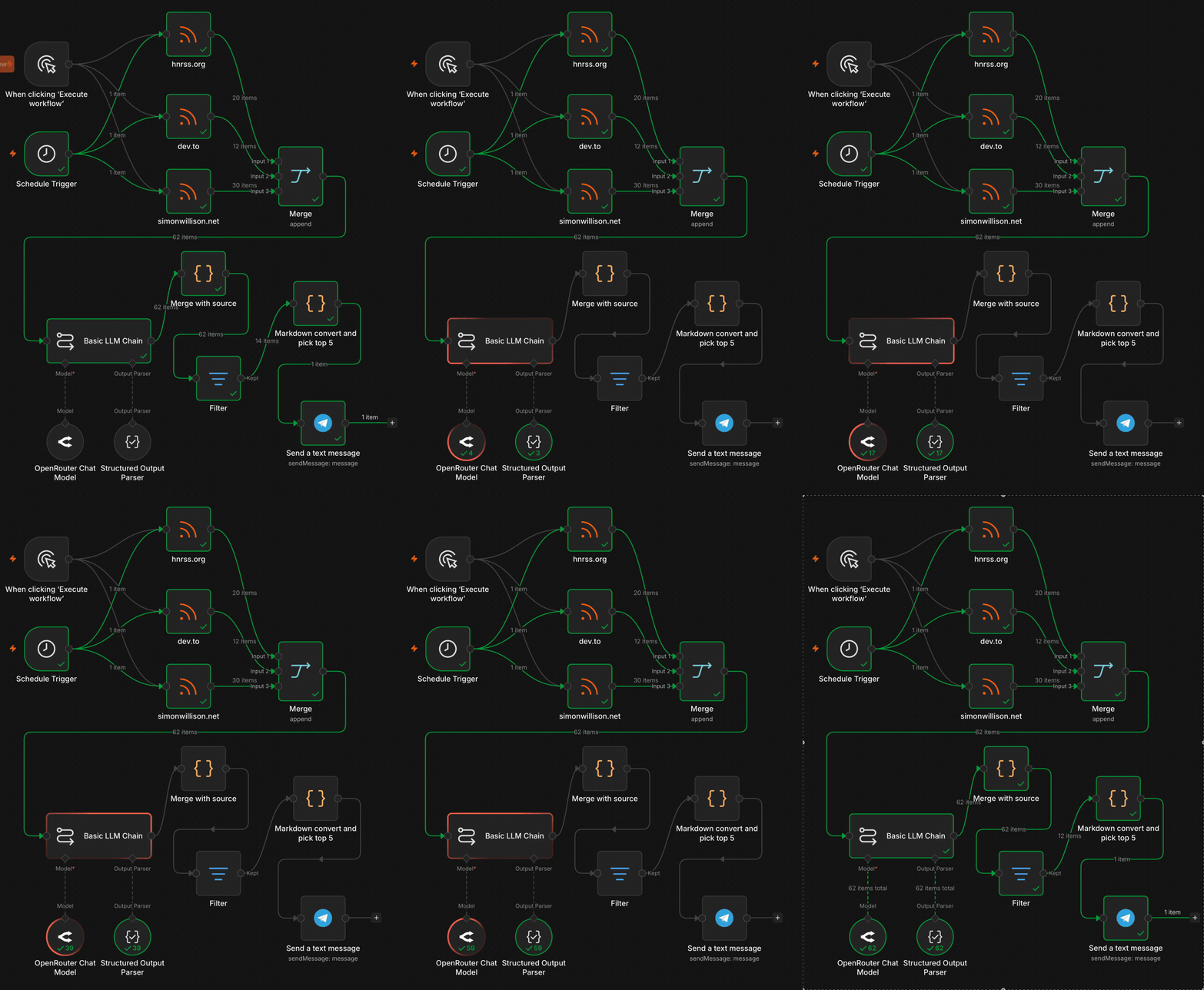 Where it ended: one run from trigger to a digest in Telegram.
The setup
n8n runs fine on my basement homelab, a Proxmox server. Lately I have been lazy: any service I want to test, I just add to an existing Docker Compose stack on my OpenMediaVault virtual machine. I joined it to the same Docker network as my Cloudflare Tunnel and pointed n8n.example.com at the container. Cloudflare Zero Trust gates that subdomain behind email two-factor, so nobody loads the n8n login without first getting a one-time code at an approved address. No port forwarding, no public IP exposure, no cloud signup. Same pattern I use for SilverBullet and a few other internal services I want to reach from the internet. About ten minutes of work.
services:
  cloudflared:
    image: cloudflare/cloudflared:latest
    container_name: cloudflared
    restart: unless-stopped
    command: tunnel run --token ${CF_TUNNEL_TOKEN}

  n8n:
    image: docker.n8n.io/n8nio/n8n:latest
    container_name: n8n
    restart: unless-stopped
    ports:
      - '5678:5678'
    environment:
      - N8N_HOST=n8n.example.com
      - N8N_PROTOCOL=https
      - N8N_PORT=5678
      - WEBHOOK_URL=https://n8n.example.com/
      - N8N_EDITOR_BASE_URL=https://n8n.example.com/
      - N8N_ENCRYPTION_KEY=${N8N_ENCRYPTION_KEY}
      - GENERIC_TIMEZONE=Europe/Helsinki
      - TZ=Europe/Helsinki
      - N8N_RUNNERS_ENABLED=true
    volumes:
      - ./n8n_data:/home/node/.n8n
Both services share the default network in the same Compose stack, so the tunnel reaches n8n at http://n8n:5678. The Docker port mapping 5678:5678 only publishes to the host and my LAN. Nothing is open on my router. The tunnel handles all inbound traffic, and the route for n8n.example.com is configured once in the Cloudflare Zero Trust dashboard, not in this file.
One correction: I first shipped this compose with N8N_BLOCK_ENV_ACCESS_IN_NODE=false, carried over from another stack. The Code nodes here never read environment variables, so it only loosened the instance for no reason.
One detail to know: N8N_ENCRYPTION_KEY encrypts credentials at rest. Lose it and you lose every saved API key in your instance. Generate it once with this:
openssl rand -hex 32Then back it up the same way you back up the rest of your secrets. I definitely need a better system for this.
The pipeline
Woah. That was my first reaction after I dropped the first nodes onto the n8n canvas. Wiring nodes together felt familiar, like sketching a schematic back in my hardware and circuit design days at university. Discrete components with named ports, signals flowing along edges, debug by following the wire. Different abstraction layer, same shape as the circuit diagrams I trained on. The decade-old part of my brain woke up immediately.
I picked one category, tech newsletters, and built a minimum viable workflow using three RSS feeds:
[Schedule + Manual Trigger]
       ↓
[RSS Read × 3]  ← Hacker News, dev.to, Simon Willison
       ↓
[Merge: append]
       ↓
[Basic LLM Chain]  ← OpenRouter GPT-4o-mini, Structured Output Parser (JSON)
       ↓
[Merge with source: Code]  ← re-attach title and link from upstream
       ↓
[Filter: score ≥ 7]
       ↓
[Markdown convert + pick top 5: Code]
       ↓
[Telegram Send Message]  ← lands in my Samantha chat
The whole thing took about two hours from “ok let me try this” to “the digest is now arriving in my Telegram.” Most of that was prompt tuning for the scorer, or getting lost in the huge catalog of integrations n8n offers, not building the thing in n8n itself. Every node I opened hinted at three more things I could wire up, and it was hard to stop looking.
One wiring detail: the LLM only returns score, reasoning, and tags. The title and link never go through the model. A Code node merges them back from the upstream RSS items with $('Merge').all(), so I do not pay tokens to round-trip text the pipeline already has. Just as important, the model never gets a chance to change the values that must stay exact. Ask an LLM to echo a URL and it will sometimes drop a character or a query parameter, and a broken link in the digest is worse than a clumsy summary.
The scoring prompt lives in n8n/prompts/scoring.md. That file is the source of truth, the workflow JSON is the deployment artefact with the same prompt embedded inside it. Keeping the prompt as its own file means I can version and review it independently from the workflow.
A small UX annoyance
n8n got something subtly wrong here, or so I thought. Worth knowing if you build this yourself. I configured the Schedule Trigger to fire every Monday at 08:00, then hit “Execute Workflow” on a Friday morning to test the wiring. The trigger output showed Friday’s timestamp. I stared at it for a minute trying to figure out what I had misconfigured.
The answer: nothing. The Execute button on a Schedule Trigger is a sample-data generator for downstream nodes. It gives you the current timestamp so the rest of the pipeline has something to work with. The real schedule only fires when the workflow is set to Active. Manual execution and scheduled execution are two different things sharing the same trigger node.
It cost me a minute of “wait, why is this Friday?” before I checked the docs. Partly on me for not reading them first, but a tooltip or a different label on the test output would remove the confusion. Hold that thought, the same team gets something very right later.
Where the sampling lives
The first version of this pipeline had a Limit node between the Merge node and the LLM scorer, capping the input to 15 items. The intent was cost control, since my OpenRouter wallet is not bottomless. Fewer LLM calls per run meant less spend, and a full run was slow anyway. One more thing, it is easy to hit a 429 rate limit on the Hacker News RSS feed.
The problem: Limit takes the first or last N items of its input. After a three-feed merge, that means the first N of the combined stream, in whatever order the Merge node appended the feeds. The truncation is positional, not random. With the cap at 15 and Hacker News appended first, the first 15 items were all Hacker News, so that is all the LLM ever saw. The other feeds were silently dropped.
I moved the truncation to the end instead. Every fetched item goes through the LLM and gets scored, and the Markdown convert step picks the top five for the Telegram digest. The cost went up roughly five times (from about half a cent per run to about a cent), which at this scale is meaningless. Now every feed gets a fair chance.
This is a small pipeline design lesson: sample at the destination, not at the source. Source-level sampling discards information. Destination-level sampling discards items that lost a fair competition.
The bug that writing this post found
Fact-checking my own post, I went to confirm the digest really showed the top five by score. It did not. The items were in merge order, not sorted at all. My first guess was that I had grabbed an old screenshot.
It was not old. The sort had been broken the whole time.
The scored items come back with score nested under output. The Code node that picks the top five sorted on the wrong path:
// wrong: a.score is undefined, so the comparator returns NaN
.sort((a, b) => b.score - a.score)

// right: the score lives under output
.sort((a, b) => b.output.score - a.output.score)
A comparator that always returns NaN does nothing, so the list stayed in merge order. Then .slice(0, 5) took the first five of that unsorted list. The digest was never the top five by score. It was the first five items that cleared the score filter, in whatever order Merge produced them.
I will say this for the editor, though. The input values sit right there on the left, and you can drag any field straight into your code, and n8n writes the reference path for you. That part is pure bliss.
What stands out is how the bug failed. No error, no crash, just a plausible-looking wrong answer. The same silent failure as the Limit node dropping whole feeds a moment ago. The expensive bugs are the ones that look fine. Writing this post is what caught it, which made for the best code review I did all week.
The 4096-character constraint
Telegram caps a single message at 4096 characters. The first full run of my digest produced 11 items with verbose LLM reasoning blocks, about 6000 characters. The Telegram node returned Bad Request: message is too long and the experiment stopped for about ninety seconds.
The constraint forced a product decision I would not have made if the destination had been infinite (like SilverBullet, where my original Python version writes a wiki page that can be as long as it wants):
- Drop to the top 5 items by score, sorted descending
- Truncate each item’s reasoning to the first sentence (a simple
split(/(?<=[.!?])\s+/)[0]) - Keep title, link, score, and three tags
The result is a digest that is easy to scan in a thirty-second glance at my phone, instead of a wall of text I would have to scroll. Five links is a small enough set to read on a coffee break, not a backlog that keeps growing. The wiki version is a reference. The Telegram version is a notification. Two different products from the same scoring pipeline.
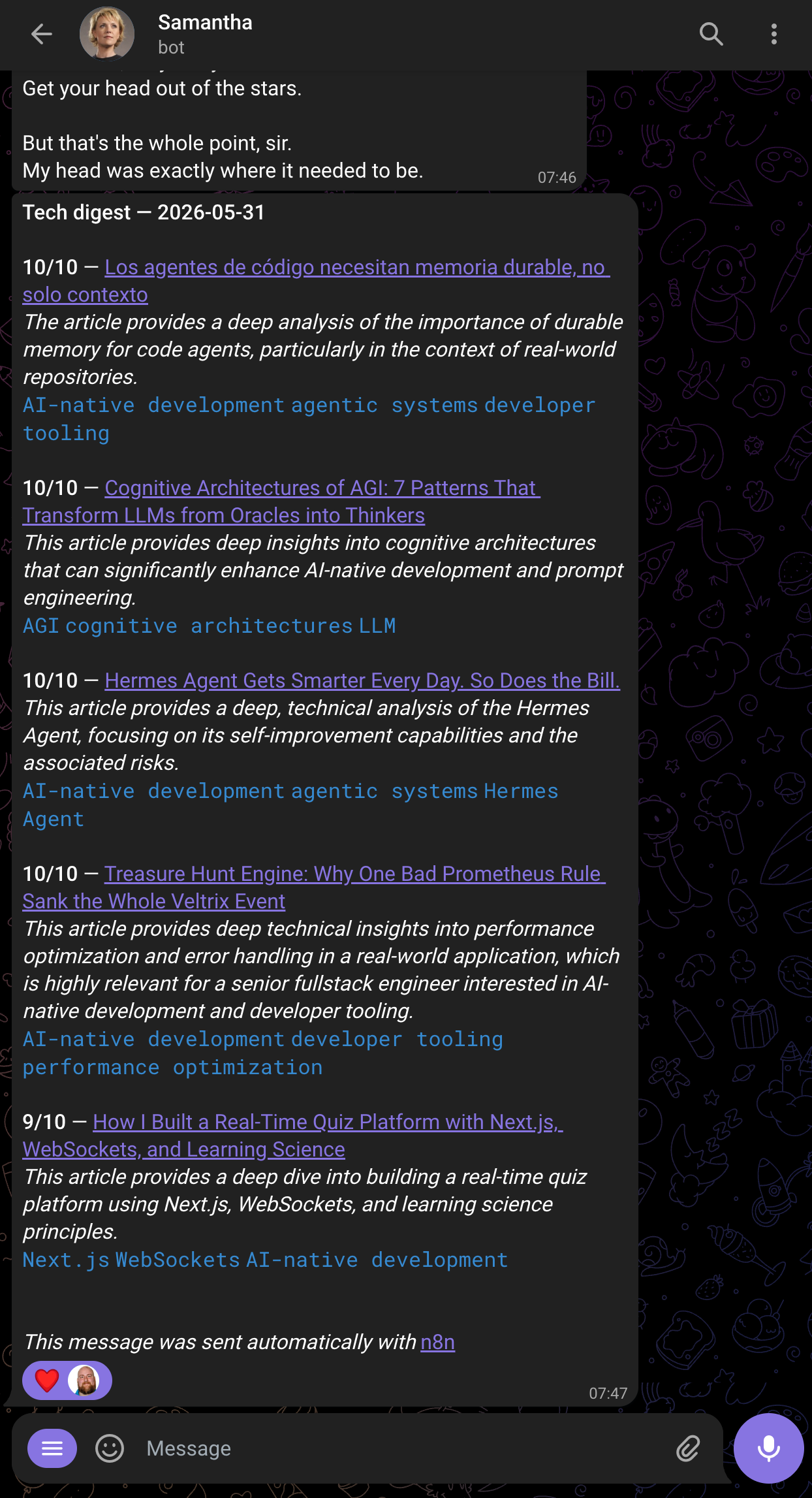 The digest lands in my Samantha chat, not a separate wiki.
That kind of design pressure does not happen when you build to a wiki destination first. The Telegram limit was annoying for ninety seconds and made the product better forever.
There is a deeper difference in how the two feel. Writing code is goal-oriented. I hold a plan in my head and execute it head down until it is done. n8n is the opposite. The canvas stays in front of me, each node suggests the next, and ideas keep firing the whole time I wire things up. Code executes a plan. On the canvas you design and build at the same time, with new ideas arriving as you go.
The twist: agent-to-agent through my daily interface
The original Python pipeline writes into SilverBullet, which means I have to remember to go and read the wiki page. That is a context switch. In practice I do not always make it.
The n8n version posts the digest into the same Telegram chat where I talk to Samantha, the persona of my Hermes agent. The digest lands in a conversation I am already in every day. Samantha can see it. I can ask her follow-up questions about an item without leaving the chat.
This is the part that really surprised me. The visual builder did not only make the pipeline easier to build. It changed the destination, and the destination change made the whole product better. When the bottleneck is “the engineer has to wire up the integration,” the cost of trying a new destination is high enough that you do not bother. When you can drag a Telegram node onto the canvas and connect it in thirty seconds, you try things you would not otherwise try. Though to be fair, I had already set up the Telegram bot and had my own chat ID ready.
A production checklist that nudges you toward production
When I clicked Publish, n8n showed a small panel with four items: set up error notifications, test the reliability of the AI steps, track time saved per run, and enable MCP access for clients consuming the workflow.
I would not have predicted this kind of UX from a workflow tool. Most SaaS products treat publishing as the destination, the marketing celebration. n8n treats it as the start of a new operational concern and raises the questions you should now be asking: how do you find out when it breaks, how do you measure if the AI step is degrading, how do you justify keeping it running. None of the items are blockers. All can be dismissed. They exist as a nudge that the workflow is now your problem.
I dismissed three and kept one (error notifications) as a TODO. The annoyance earlier in this post and this nudge come from the same instinct, one missed, one landed. Call it product care or call it good onboarding, it pushed me toward the right habit.
Reproduce it
Four steps, with the full detail in the repo README:
- Run n8n behind a tunnel with the Compose stack above (homelab in basement optional). Generate the encryption key and back it up.
- Add two credentials in n8n: an OpenRouter API key, and a Telegram bot token from BotFather.
- Import
workflow.json. Set your Telegram chat ID on the Send Message node, and pick the credentials on the OpenRouter and Telegram nodes. - Click Execute Workflow to test. Once the digest lands in your chat, flip the workflow to Active and it runs every Monday at 08:00.
What is in the repo
Everything lives in qualityoflife: the n8n workflow JSON, the scoring prompt versioned separately, screenshots of the canvas, and a setup README, all under n8n/. The original Python pipeline sits next to it in agents/ and scripts/, so you can read the diff between the two implementations on the same branch.
The comparison between code, canvas, and just asking your assistant gets its own post, “Three ways to curate your tech digests”, coming soon. If you want to talk about where visual workflows belong in an AI-native dev stack, I am always happy to have that conversation.